Why Photos Matter More Than You Think
You have a great rental property in Kitengela or Syokimau, but it’s been sitting on the market for weeks. The problem is often not the property – it’s the photos. On RentSpace, listings with professional‑quality images receive 3‑5x more inquiries and rent up to twice as fast. In 2026, tenants scroll through dozens of listings on their phones. The first impression is visual. A dark, cluttered, poorly angled photo says “neglected property” even if the home is perfect. Good photos signal that you care, that the property is clean, and that you’re a professional landlord. On RentSpace, we’ve seen listings with bright, wide‑angle photos get booked for viewings the same day.
🏠 See Listings with Great Photos
These properties rented quickly – learn from their visual presentation.
Loading example listings...
Equipment: You Don’t Need a Fancy Camera
A modern smartphone (iPhone 8 or newer, Samsung Galaxy S9 or newer) with a good camera is enough. What matters is technique. Use natural light, stabilise the phone, and clean the lens. Avoid digital zoom – move closer instead. For KSh 500 you can buy a cheap tripod or use a stack of books to keep the phone steady. Pro tip: wipe the lens with a microfiber cloth before every shoot – fingerprints ruin sharpness.
Step‑by‑Step: How to Take Winning Rental Photos
1. Prepare the Unit (The Night Before)
- Declutter – remove personal items, excess furniture, and visible clutter.
- Clean thoroughly – especially kitchens, bathrooms, and floors.
- Open curtains and blinds – natural light is your best friend.
- Turn on all lights (even during daytime) – it adds warmth.
- Make beds with neutral linen; add a small vase or plant for life.
2. Shoot During “Golden Hours”
Take photos between 10am‑2pm for bright, even light. Avoid harsh shadows of midday – overcast days are actually excellent because light is soft and diffused.
3. Use the Right Angles
- Stand in the corner – to show the full room, stand in the corner and shoot diagonally across.
- Keep camera at chest height (about 1.5m) – too low or too high distorts proportions.
- Use wide‑angle mode (0.5x on most phones) – this makes rooms look larger without obvious distortion.
- Horizontal orientation – always landscape, never portrait, for room shots.
4. Must‑Capture Shots for Every Listing
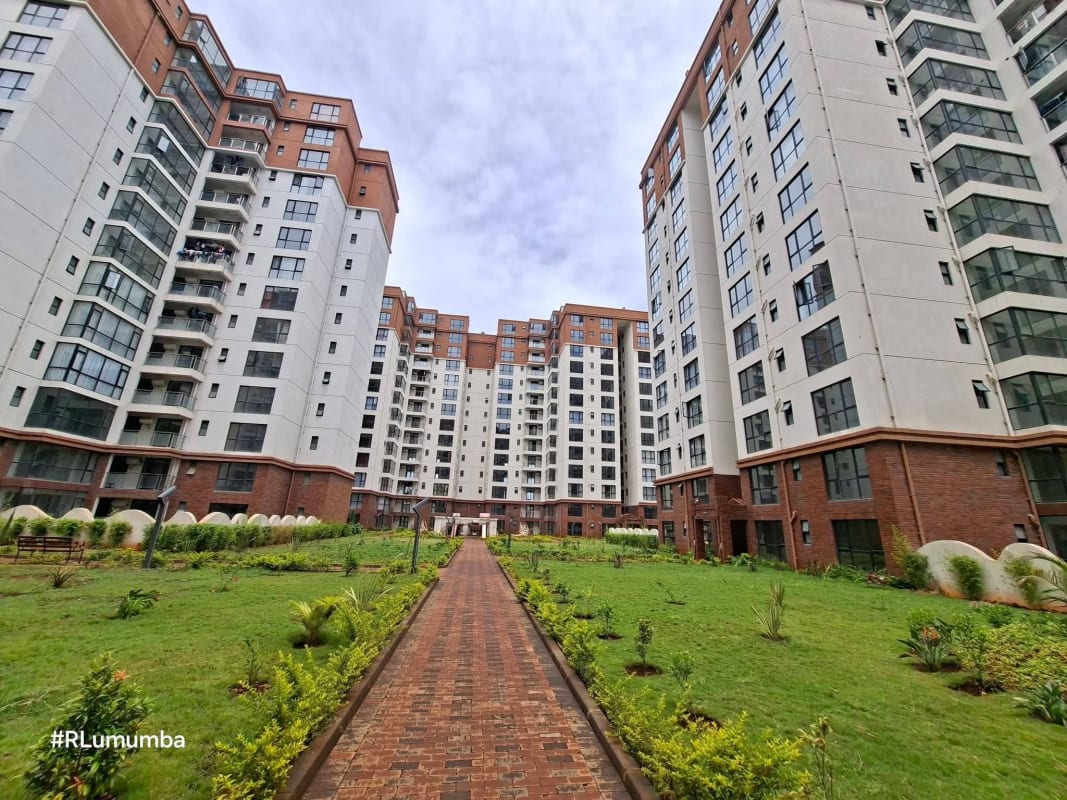
- ✅ Exterior (front of building, showing entrance and parking).
- ✅ Living room (from two different corners).
- ✅ Kitchen (including countertops and appliances).
- ✅ Master bedroom (with closet visible).
- ✅ Bathroom (clean, with towels folded).
- ✅ Outdoor space (balcony, garden, or compound).
- ✅ Amenities (swimming pool, gym, clubhouse – if applicable).
5. Avoid These Common Mistakes
- ❌ Taking photos at night or with flash (creates harsh shadows).
- ❌ Including people or pets in the frame (distracts).
- ❌ Using portrait mode (blurs out background – not desirable).
- ❌ Over‑editing (oversaturated colours look fake).
- ❌ Focusing on minor defects (a small crack – don’t highlight it).
Basic Editing – Less Is More
Use free apps like Snapseed or Lightroom Mobile. Adjust:
- Brightness – increase slightly if the image is dark.
- Warmth – add a touch of warmth to make rooms inviting.
- Straighten – fix tilted horizon lines.
- Crop – remove distracting edges.
Avoid heavy filters, HDR (creates halos), or changing wall colours – tenants will be disappointed when they view in person.
After the Shoot: Optimise Your RentSpace Listing
- Order photos logically – exterior, living, kitchen, bedrooms, bathrooms, outdoor, amenities.
- Add a video tour – RentSpace allows short video clips. A 30‑second walkthrough dramatically increases engagement.
- Write a compelling title and description – highlight unique features (e.g., “3‑bed bungalow near Gateway Mall with solar heater”).
- Be responsive – the faster you reply to inquiries, the more RentSpace’s algorithm boosts your listing.
- Update your listing weekly – refreshing the posting date pushes it to the top.
Real Example: From 0 Inquiries to Rented in 24 Hours
A landlord in Syokimau took dark, cluttered photos of their 2‑bedroom apartment. After following this guide – including cleaning, shooting at 11am, and adding exterior shots – the listing received 12 inquiries in 6 hours and was rented within 24 hours. The rent achieved was KSh 3,000 above their original asking price. The landlord also added a 30‑second video walkthrough shot on their phone, which doubled the click‑through rate.
Short‑Stay Listings That Succeed
Great photos are even more critical for nightly rentals. See examples of high‑converting short‑stay listings.
Loading short‑stay examples...
What If I Can’t Take Good Photos Myself?
RentSpace offers a professional photography service for landlords (from KSh 2,500). One‑off cost that typically recoups itself within one month of higher rent or faster vacancy fill. Contact us to book a photographer. For larger portfolios, we offer discounted packages.
See Listings with Great Photos
The property recommendations above show real listings that rented quickly. Study their photo order, angles, and staging.
Short‑Stay Listings That Succeed (Airbnb)
The Airbnb recommendations above are examples of short‑stay units with exceptional photography – note how they highlight unique selling points (e.g., pool, workspace, garden).
Frequently Asked Questions (Listing Photos)
RentSpace allows up to 20 photos. Aim for 12‑15 high‑quality shots. Fewer than 8 reduces inquiries significantly.
Basic adjustments like brightening, straightening, and cropping are fine. Avoid heavy filters or altering colours – tenants expect authenticity.
High‑quality photos, competitive pricing, and fast response to inquiries are the main factors. You can also request a “boost” via your landlord dashboard.
A modern smartphone (iPhone 8 or newer, Samsung Galaxy S9 or newer) is sufficient. Use natural light, a clean lens, and stabilise the phone against a wall or use a cheap tripod (KSh 500).
Ready to Rent Your Unit Faster?
Apply these photography tips today, update your RentSpace listing, and watch inquiries roll in. Need professional help? Contact us for a photography package.
Get Listing Optimisation Help →


